Tampilkan postingan dengan label hard. Tampilkan semua postingan
Tampilkan postingan dengan label hard. Tampilkan semua postingan
Senin, 29 Juli 2013
How to Hard Reset HTC Freestyle
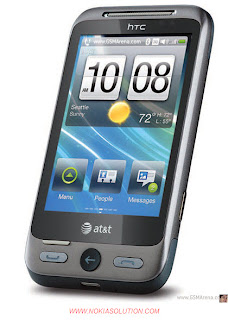
If you face some difficulty with your mobile such mobile is very slow or it is hanging and mobile shows any unexpected behavior. If there is a problem with any installed application which you cannot uninstall. When a mobile is not working properly or not responding quickly you may have to reset it. It is advisable to execute soft reset first and if soft reset could not solve your problem then you need to hard reset. Many cell phone company gives user the opportunity to hard reset their mobile by may way and many mobile users say hard reset as many names which described below.
- From the main Home screen, press OPTIONS, and then tap Settings > Security > Factory reset.
- Now Enter 1234, and then tap OK.
HARD RESETTING HTC FREESTYLE BY BUTTON:
Turn off the phone
- Press and hold the VOLUME UP, VOLUME DOWN and POWER/LOCK SCREEN buttons.
- When prompted, press VOLUME DOWN to perform the factory reset, or press any other button to cancel the reset.
- When prompted, press VOLUME DOWN to turn on the phone.
Important:
* Please Do Not Hard Reset Your Mobile without Any Unrecoverable Difficulty.
** Hard Reset Will Erase All User Data from Your HTC Freestyle.
So Keep In Mind To Back Up Your Important Data Before Hard Reset.
*** Please Fully Charge Your Phone Battery before Hard Reset Because Any Power Failure May Damage Mobile Permanently.
****Some Times Reset Can Damage Your Mobile.
YOU MAY ALSO ASK HTC FREESTYLE HARD RESET AS FOLLOWING:
HOW TO RESET HTC FREESTYLE
HOW TO RESTORE HTC FREESTYLE:
HOW TO FORMAT HTC FREESTYLE:
HOW TO MASTER RESET HTC FREESTYLE:
HOW TO FACTORY RESET HTC FREESTYLE:
HOW TO HARD RESET HTC FREESTYLE:
HOW TO FULL RESET A HTC FREESTYLE:
HOW TO FULL RESTORE A HTC FREESTYLE:
HOW TO MASTER RESTORE HTC FREESTYLE:
HOW TO MASTER RESET HTC FREESTYLE:
HOW TO FULL FACTORY RESET HTC FREESTYLE:
HOW TO HARD FORMAT HTC FREESTYLE:

Selasa, 30 April 2013
Hard Reset Nokia N97
Hard reset is reset factory settings and formatting at the same time. If your phone Nokia N97 hangs and can not be soft reset by signing the settings menu, this way you can do by pressing the caps shift, space bar, delete (picture beside which are marked in red) and power button simultaneously approximately 5 seconds. Dont forget to backup the data first, because it will be lost. Wait until the phone restarts automatically and is ready for use. Perform the full power batrre condition so as not to stop when formatting and destructive software. |  |
Kamis, 11 April 2013
How To Samsung Galaxy S5830 Hard Reset Solutions
Follow the following diagrams to hard reset Samsung Galaxy S5830 :


Hope You Liked This Post. Thank You !!!!!
Search Tags: How To-Samsung Galaxy S5830 Hard Reset Solutions
How To-Samsung Galaxy S5830 Hard Reset
Samsung Galaxy S5830 Hard Reset Method
Jumat, 29 Maret 2013
How to Hard Reset HTC Desire
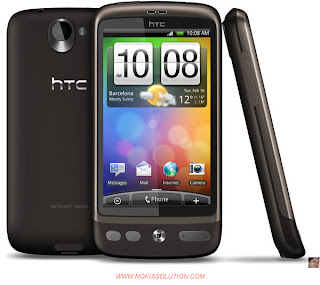
HOW TO RESET A HTC DESIRE:
You May Call As:
HOW TO RESTORE A HTC DESIRE:
You May Call As:
HOW TO FORMAT HTC DESIRE:
You May Call As:
HOW TO MASTER RESET HTC DESIRE:
You May Call As:
HOW TO FACTORY RESET HTC DESIRE:
You May Call As:
HOW TO HARD RESET HTC DESIRE:
You May Call As:
HOW TO FULL RESET A HTC DESIRE:
You May Call As:
HOW TO FULL RESTORE A HTC DESIRE:
You May Call As:
HOW TO MASTER RESTORE HTC DESIRE:
You May Call As:
HOW TO MASTER RESET HTC DESIRE:
You May Call As:
HOW TO FULL FACTORY RESET HTC DESIRE:
You May Call As:
HOW TO HARD FORMAT HTC DESIRE:
HTC DESIRE Factory Resetting:
- From the Home screen, press , and then tap Settings.
- Tap .
- Tap Reset phone, and then tap Erase everything.
1. Take out the battery, stay for a few seconds, and then reinsert the battery.
2. Press and hold the VOLUME DOWN button, and after that briefly press the POWER button.
3. Stay for the screen with the three Android images to appear, and after that free the VOLUME DOWN button.
4. Press to select FACTORY RESET, and then press the button.
Important:
* Please Do Not Hard Reset Your Mobile without Any Unrecoverable Difficulty.
** Hard Reset Will Erase All User Data from Your HTC Desire.
So Keep In Mind To Back Up Your Important Data Before Hard Reset.
*** Please Fully Charge Your Phone Battery before Hard Reset Because Any Power Failure May Damage Mobile Permanently.
****Some Times Reset Can Damage Your Mobile.
Langganan:
Komentar (Atom)